Undone Season 2
In 2018 and 2019, I very much enjoyed working on Undone's first season, so when production for season 2 began, I gladly accepted the offer to join the team once again!
For season 2, the 3D team had a much clearer workflow, and we were able to work together with the oil painters and touch up department much more efficiently, despite the fact that we had to work completely remote due to the pandemic of 2020. For each environment, I would receive 1 or 2 oil paintings to use for reference. I would then use bits and pieces from these paintings to texture the set, painting the hidden areas myself using custom oil paint brushes in Photoshop. If the deadline was particularly close I received help from an artist from the Touch Up department; they editted every 3D render digitally to make them look more like oil paintings, often adding more brushy textures and adjusting the details to make it more believable. Aside from the diffuse maps I would often also paint custom roughness maps using digital oil brushes, mainly for wooden floors, so that moving shots would look more convinving as well. Of course the lighting was also a very important part of the process; for several sets, I would combine "baked" lighting and 3D lighting, since 3D lighting alone would often ruin the oil painting illusion.
Throughout the season, I was also responsible for previz and layout. In the previz phase, I was able to quickly set up, and often improve upon the compositions created by the storyboarders. Due to my results, I became the sole previz artist from episode 5 onwards.
This season also contained many interesting fantastical VFX shots. As I was a fresh graduate during season 1, I wasn't given these kinds of tasks, however, I proved myself to be a quick learner and picked up these shots throughout the entirety of season 2.
From June 2020 until December 2021, I was a 3D artist for Undone.
Programs used: Blender, Photoshop, Embergen
> Previs (episodes 5-8 I was the only previs artist); 3D Layout; Texturing; Lighting; Rendering; VFX; Animation
VFX
(Particles, cloth sim, moving shots...)
I textured the floor and moving hallway in this shot, and set up the breaking floor VFX. Hiding the hallway at the beginning of the shot was a fun little trick that I set up by using the Holdout masking function in the visibility settings.
This was the most complex shot I worked on throughout this season. The oil painters provided 3 paintings of this location for me to use: the low angle at the very beginning (with the cactus in the foreground), the wide shot roughly 6 seconds into the shot where the camera is at the height of the treetops, and the widest shot right before the clouds come in.
After creating textures from all 3 paintings, I needed to blend them together seamlessly. 3 textures ended up not being nearly enough for many parts of the set, particularly for the ground. For the ground, I ended up creating 8 different textures, that would blend together depending on the angle of the camera, as well as the distance from the camera. I also used custom masks and keyframed the blending to get it to look as seamless as possible.
In this scene, I was responsible for the floating petals. This was my favourite VFX shot to work on during season 2.
The storyboard showed each step of this petal vortex, and I had a lot of fun testing out different approaches to get the right look. In the end, I set up 5 emitters that were parented to an empty, so that they could be rotated together, while a vortex force field in the center pulled the petals toward the center.
I also enjoyed simulating the petals floating in the wind in the shots following the vortex shot.
I modelled, textured and animated the growing dahlia in this shot.
This was a fairly straightforward effect, as I simply setup the full plant using an array modifier, and had it follow the curves that led toward the camera at the right moment.
Just like in the final episode of season 1, I was responsible for the trees, rocks, and flora seen in the background of this scene in the final episode of season 2.
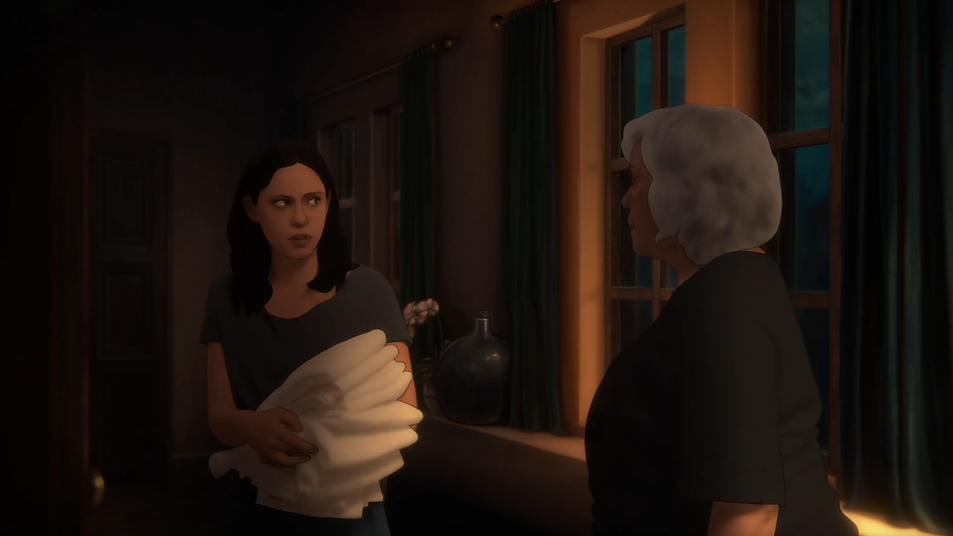
In this scene, I was responsible for texturing and simulating the curtains.
Figuring out how to animate this door was an interesting challenge. The storyboard consisted of 3 frames, where the piece of paper appaears, then "unfolds" to become a door, but the exact motion was a bit vague.
To get a better sense for how this piece of paper was to unfold, I folded up different little bits of paper and experimented with different ways to unfold them. Should there be a cut? Should it unfold in just one direction for a more dramatic effect, or unfold in different directions to look more crumpled, like it's been forgotten? Due to how short the shot was, I opted for only unfolding it in a downwards motion, so that the viewer could quickly see what it was.
3D SETS
(Previz, Layout, Texturing, Lighting, Rendering)


Due to this location being seen in both the daytime and nighttime, I needed to create 2 different version of the set. This would be straightforward for a typical 3D set: simply adjust the lighting! However, in order to make each render look like an oil painting, I needed to use a different approach.
For the "afternoon" version of the set, I used a mix of "painted" lighting, and 3D lighting. The 3D lighting could help set the overall feel of the set, but the oil painters would exagerate the lighting in certain areas in a very particular way, so I opted to leave these lit sections in the diffuse maps. For example, the highly saturated area on the table, as well as the area on the floor are painted.
Of course at night you wouldn't have these brighlty lit areas, so I painted custom textures for the night version of this location without them. In this version of the set, I also made use of lights with negative power, to create darker areas like the oil painters did.


For the mental hospital, we did not have a day version and a night version: we had a 1990s' version (with the orange curtains, and the box TV) and a 1950s' version.
As you may have noticed in the wide shot with the orange curtains, there are some shadows on the wall near the ceiling. This is another example of lighting that was painted into the texture, in order to have full control over the painterly look. The wall corners and edges of the floors were also made darker to replicate the look of the original oil paintings.